
Make a Deposit
Follow these four simple steps to make a check deposit in the Baird Online mobile app.
STEP 1
Verify Identity
STEP 2
Select Accounts
STEP 3
Capture Check Image
STEP 4
Review & Submit

STEP 1
Verify your identity
Before you can make a transfer, you will be asked to verify your identity using multifactor authentication. This added step helps protect your account and your information.
Choose an authentication method:
-
Receive a code via SMS
-
Call the Baird Online Service Desk
Enter code:
-
Enter the code on your device to complete identity verification.
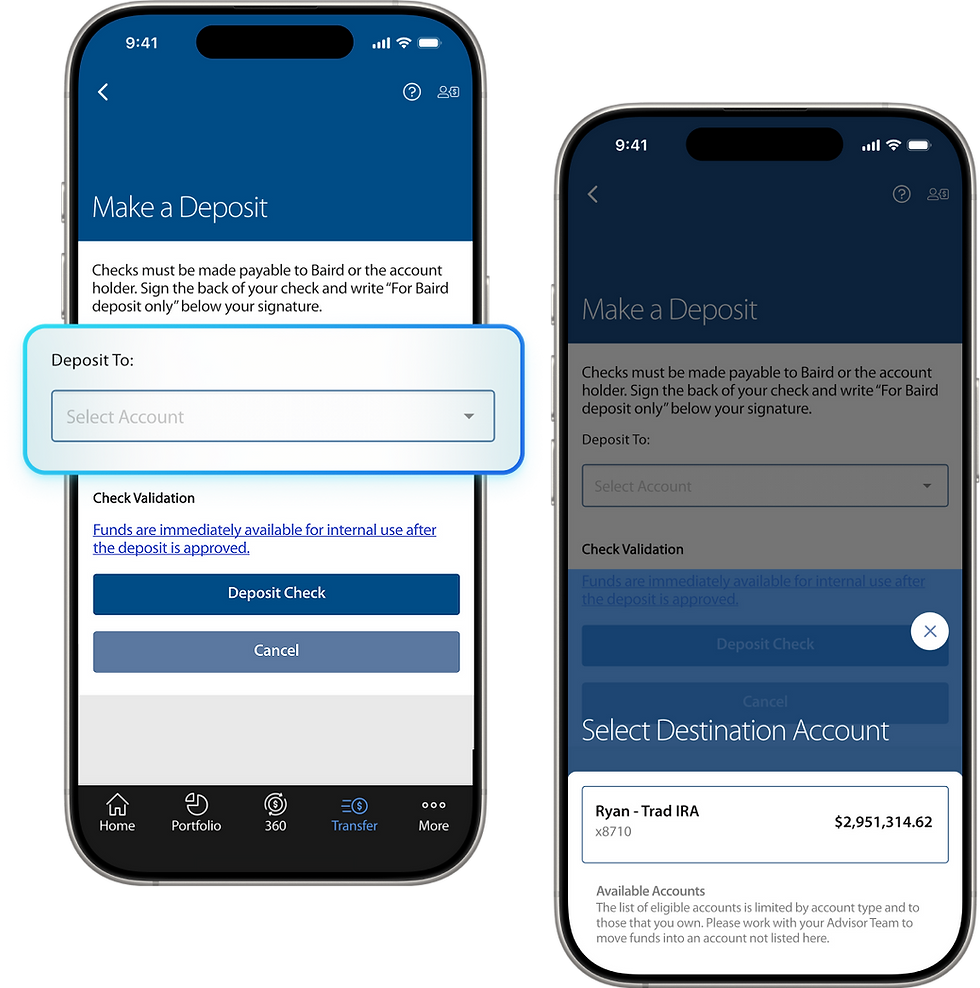
Step 2
Select a destination account
-
Select any of your Baird accounts into which to deposit money.
-
All owned and open account types are supported with the exception of Beneficiary IRAs.
-
To deposit a check into multiple accounts, contact your advisor team.

Step 3
Use your camera to capture images of the check
Allow Camera Access:
-
You will need to allow the Baird Online Mobile App to access the device camera before using Mobile Deposit.
Deposit Amount Limits:
-
-
Maximum single item deposit limit: $250,000
-
Minimum deposit amount: $0.01
-
Auto Image Capture:
-
Simply hold your mobile device camera over the check and an image of the check is captured automatically.
Manual Image Capture:
-
In the event there are issues with auto capture, align the check within the brackets and manually capture the image.

Step 4
Review & Submit
Review:
-
Review the destination account and amount.
-
The amount is auto-captured using the image capture feature and automatically populates this field.
-
Adjust the amount if inaccurately auto-captured.
Submit:
-
Once everything looks right, submit your deposit with confidence.
-
Funds are immediately available for internal use within your Baird account after the deposit is approved.
-
There is a 6 business day hold for distribution of the deposit.

Check Deposits
Deposit Activity
You can view the status and details of your check deposits from:
-
Deposit Activity
-
Account Activity
Deposit Details:
-
The following details can be viewed by selecting a deposit in Deposit Activity:
-
Check Amount
-
Account
-
Date/Time
-
Status (Pending, Complete, Error)
-
Rejected Deposits:
-
An error will display if the deposit was rejected.

Check Deposits
Notifications & Updates
We will keep you updated on the status of your check deposits with email notifications and My Updates in the mobile app.

/
MOBILE APP
/
Check Deposits
Mobile Check Deposits
You can now deposit a check into your Baird accounts using the mobile app.