


Investments
The Investments section allows clients to view and navigate their portfolio balance information at the household level, review change in value, view asset allocations, and more.

Learn how to navigate and customize the Investments screens with this 3-minute video.
Accounts
Accounts Overview
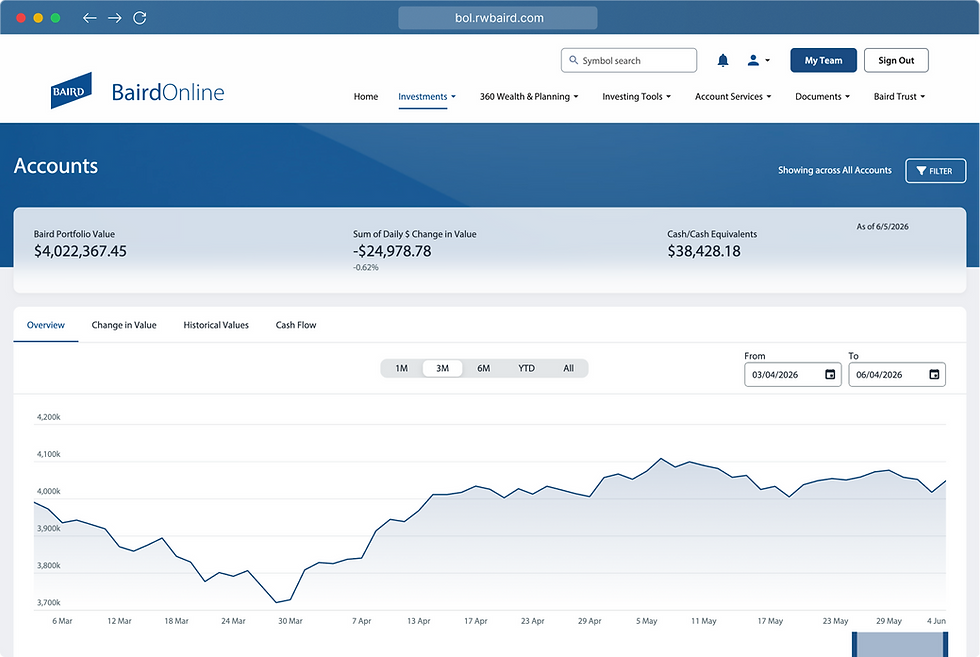
The Overview tab displays detailed information about a client’s Baird accounts, including a chart showing market value over time and a table summarizing key account details.
Accounts
Change in Value
The Change In Value tab shows how each account’s value has moved over time, including today’s change and longer‑term performance, so clients can quickly understand what’s driving gains or losses. It provides a clear, account‑by‑account view of market impact and value changes across month‑to‑date and year‑to‑date periods.

Accounts
Historical Values
The Historical Values tab shows how a client’s total portfolio value has changed over time, displaying balances at key dates along with dollar and percentage changes from prior periods. It helps clients track long‑term growth and understand how their portfolio has evolved year over year.

Accounts
Cash Flow
The Cash Flow tab shows money moving into and out of a client’s accounts over time, including deposits, withdrawals, dividends, and interest. It helps clients understand how cash activity contributes to their overall portfolio and income across selected time periods.

Holdings
Holdings by Market Value
The Holdings by Market Value screen shows a client’s investments ranked by market value, combining a visual allocation chart with a detailed table so clients can easily see their largest positions and understand how each holding contributes to the overall portfolio.

Holdings
Holdings by Asset Category
The Asset Category screen shows how a client’s portfolio is allocated across major asset types such as equities, fixed income, and cash, using a clear visual breakdown. It helps clients quickly understand diversification and how their investments are distributed across different asset categories.

Holdings
Holdings by Asset Class
The Asset Class screen shows how a client’s investments are distributed across more specific investment types such as large‑cap stocks, international equities, fixed income, and cash, within the overall portfolio. It helps clients better understand diversification and risk by breaking assets into familiar investment categories.

Holdings
Holdings by Multi-Asset Class
The Multi‑Asset screen shows how a client’s investments are allocated across major asset groupings, such as equities, fixed income, and cash, within the portfolio. It gives a clear, high‑level view of diversification while allowing clients to see the holdings that make up each multi‑asset category.

Holdings
Realized Gain/Loss
The Realized Gain/Loss tab shows profits or losses from investments that have been sold, broken out by short‑term and long‑term activity. It helps clients understand the results of completed trades and their impact on overall portfolio performance.

Holdings
Unrealized Gain/Loss
The Unrealized Gain/Loss tab shows how much a client’s current holdings have increased or decreased in value based on today’s market prices, before anything is sold. It helps clients understand potential gains or losses across their investments while they remain invested.

Investments
Activity
The Activity screen provides a clear summary of recent transactions across a client’s accounts, including deposits, withdrawals, dividends, interest, and investment activity. It helps clients easily see how money has moved in and out of their portfolio over the selected time period.

Activity Chart
The Activity Chart summarizes financial activity by transaction type for a selected period, visually showing the dollar impact of items like asset sales, withdrawals, dividends, and fees.

Dynamic Filters
Filter the screen by transaction type, account and time period.

Activity Details
The Activity Details view provides a full breakdown of a single transaction—including account information, activity type, security details, amounts, and dates.

Activity Table
The Activity Table presents a detailed, searchable list of transactions for a selected period, showing dates, accounts, activity types, securities, quantities, and dollar amounts. Click the “Activity Details” button to view more information about that transaction.

Investments
Performance
The Performance screen shows how a client’s portfolio has performed over time, including year‑to‑date and longer‑term returns, with clear visual comparisons. It also breaks down performance by account so clients can see how each account contributes to their overall results.

Performance by Account Chart
The Performance by Account chart shows how each individual account has performed over key time periods, allowing clients to quickly compare gains or losses across their accounts at a glance.

Performance Summary
The Performance Summary card highlights your overall account value and presents key performance returns across multiple time periods.

Dynamic Filters
Filter the screen by account, account group, and performance as of date.

Broad Market Indices
The Broad Market Indices table provides a snapshot of how major U.S. and international equity and bond indices are performing across multiple time periods, helping clients quickly compare overall market trends to their portfolio performance.

Investments
Balances
The Balances screen gives clients a clear snapshot of their account value, showing total portfolio value, daily change, and available cash at a glance. It also includes a simple asset allocation view so clients can quickly see how their investments are distributed across asset types.

Investments
Orders
Check on the status of executed, open or canceled orders across your Baird accounts.

Orders Table
The The Orders Table displays a detailed, sortable list of a client’s open and historical orders, including security information, order type, quantities, and current status, allowing clients to easily track and monitor the progress of their trades in one place. by Account chart shows how each individual account has performed over key time periods, allowing clients to quickly compare gains or losses across their accounts at a glance.

Order Details
Click the “Order Details” button on the right to view more details on an individual order. View individual order details that includes Account Number, Security Name, Asset Classification, Action Type, Time in Force, Quantity and Limit Price.
